
Platform / Forms
Create multi-step application forms for any license or permit type. Drag in fields, add pre-built sections, preview with your city's branding, and publish. No developer required.
Key Benefits
Your forms, your way, live in minutes.
Build, brand,
publish, update
Build without a developer
Drag and drop fields, add pre-built section templates, and organize multi-step flows. Publish when you're ready. Update anytime.
Branded for your jurisdiction
Every form your community sees carries your city's name, logo, and branding. The experience feels like it belongs to your agency.
Connected to everything else
Submissions flow directly into the Applications queue for review. Campaign recipients land on these forms. The data stays connected.
Form Management
All your forms in one place.
The Forms page lists every application your agency has created: business license applications, home occupation permits, special events permits, short-term rental registrations, and more. Each form shows its status, which license type it's connected to, and when it was last updated. As your licensing requirements change, update the form and republish without any downtime.
- Status badges: Published, Draft, Needs Review, Rejected
- License association on every form
- Start from scratch, template, or import
Forms
Build, publish, and update license application forms
Home Occupation Permit
Used by Home Occupation Permit
Special Events Permit
Not assigned to a license
Business License Application
Used by City Business License
Short-Term Rental Registration
Not assigned to a license
Mobile Vendor Permit
Used by Mobile Vendor Permit
Sign Permit Application
Not assigned to a license
City of Atlanta · Business Licensing
Business License Application
Legal business name
Business type
Business address
Form Builder
Drag, drop, and publish.
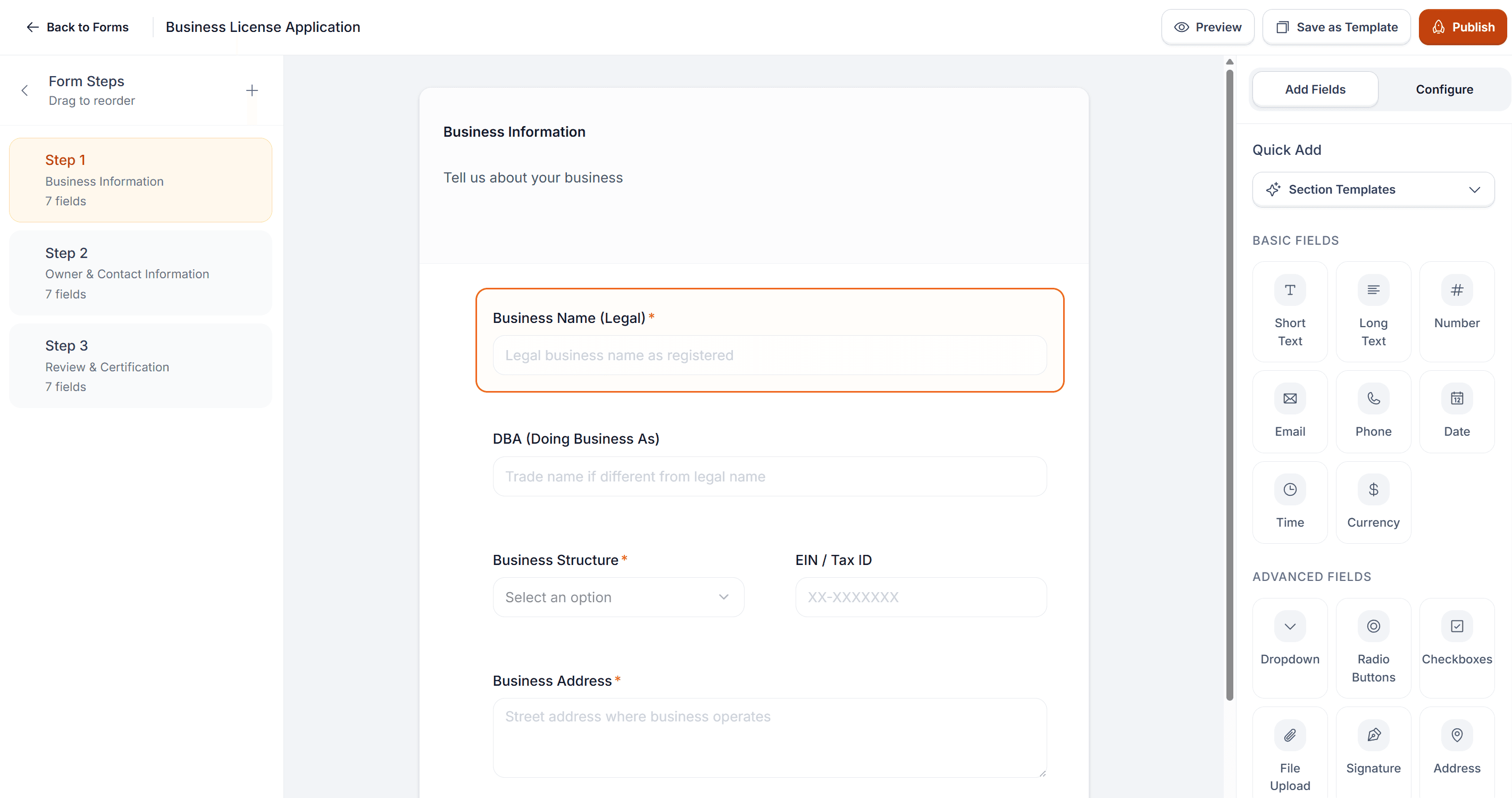
The form builder gives you a three-panel workspace. Steps on the left, the applicant's form canvas in the center, and the field palette on the right. Basic fields like text, number, email, phone, date, and currency. Advanced fields like dropdowns, signatures, addresses, SSN and EIN inputs, and file uploads. Every field is fully customizable — labels, placeholders, validation rules, required status.
- Three-panel builder: steps, canvas, field palette
- Basic + advanced field types out of the box
- Per-field validation, labels, and required rules
Section Templates
Pre-built sections to get you started fast.
Instead of adding fields one by one, section templates let you drop in an entire group of related fields at once. Contact Information adds name, email, phone, and address. Business Details adds business name, type, and registration info. Other templates cover document uploads, certification and signature blocks, background checks, operating hours, professional references, and insurance and bonding. For forms you build frequently, save your own configurations as templates to reuse later.
- Eight pre-built section templates, ready to drop in
- Fully customizable after insertion
- Save your own sections as reusable templates
Quick Add
Contact Information
Name, email, phone, and address fields
Business Details
Business name, type, and registration info
Document Upload
File uploads for supporting documents
Certification & Signature
Acknowledgment checkbox and signature
Background Check
Criminal history and license revocation questions
Operating Hours & Location
Business hours, days of operation, and facility details
Professional References
Contact information for professional references
Insurance & Bonding
Insurance coverage and bonding information
City of Scottsdale
Business License Application
Business Information
Tell us about your business
Business Name (Legal) *
DBA (Doing Business As)
Business Structure *
EIN / Tax ID
Business Address *
Branded Preview
See what your community will see.
Preview mode shows your form exactly as an applicant will experience it, branded under your city's name with your logo and the full step-by-step flow visible at the top. The applicant sees a clean, guided process: one step at a time, clear labels, a simple Continue button to move forward. This is the same form that campaign recipients will land on when they click through a compliance notice — so the experience needs to be clear and professional.
- Jurisdiction brand header with logo and agency name
- Step-by-step applicant flow with clear progress
- Publish only when it looks and reads right
By Role
Built for the team that manages applications.
Create and update forms yourself.
Add new permit types, adjust fields for regulatory changes, and publish updates without waiting on IT or outside vendors.
Forms that feed your review queue.
Every submission lands in the Applications page with all the data structured and ready for review. No re-keying from paper.
A modern experience for your community.
Applicants complete forms online, on any device, with your city's branding. It's the kind of service residents expect.
See it with your license types
Replace paper applications for good.
We'll show you how the form builder works and how quickly you can publish your first application.