
Platform / Applications
Every license and permit application in one place. Automated validation catches issues before your team opens the file. Approve, reject, or request info without leaving the screen.
Key Benefits
Faster reviews. Fewer mistakes.
Validation, review,
and action in one surface
Automated validation up front
Every application is checked for issues before it reaches your queue. Errors, warnings, and passed checks are summarized so you know what to focus on.
Review one or review them all
Open a single application for a quick check, or hit Start Review to work through your entire pending queue in full-screen mode.
Act without switching tools
Approve, reject, or request additional information directly from the review screen. The applicant is notified automatically.
A bigger queue, not a bigger team
Validation, notifications, and reminders run on their own — so the volume your team can absorb grows without adding staff.
The Queue
Your workload at the top of the page.
The Applications page opens with four summary cards showing exactly where things stand: how many are pending review, in review, need attention, and are ready for auto-approval. Filter by status, assessment result, or license type to focus on what matters. Sort by wait time to prioritize applications that have been sitting the longest.
- Four summary KPIs, counted in real time
- Auto-check result on every row at a glance
- Wait-time sorting with overdue flags
Queue
Bella Cucina
Food Service
Midtown Market
Retail
Ace Plumbing
Contractor
Southern Tech
Professional
Appl-2045
Bella Cucina Restaurant
3 validation issues
Health certificate expiring · Liability coverage below threshold · Grease trap inspection overdue
Business Information
Business Name
Bella Cucina Restaurant LLC
DBA
Bella Cucina
Federal EIN
34-5678901
NAICS Code
722511
Primary Address
142 Peachtree St NE
City / State / Zip
Atlanta, GA 30303
Application Review
Everything you need in one view.
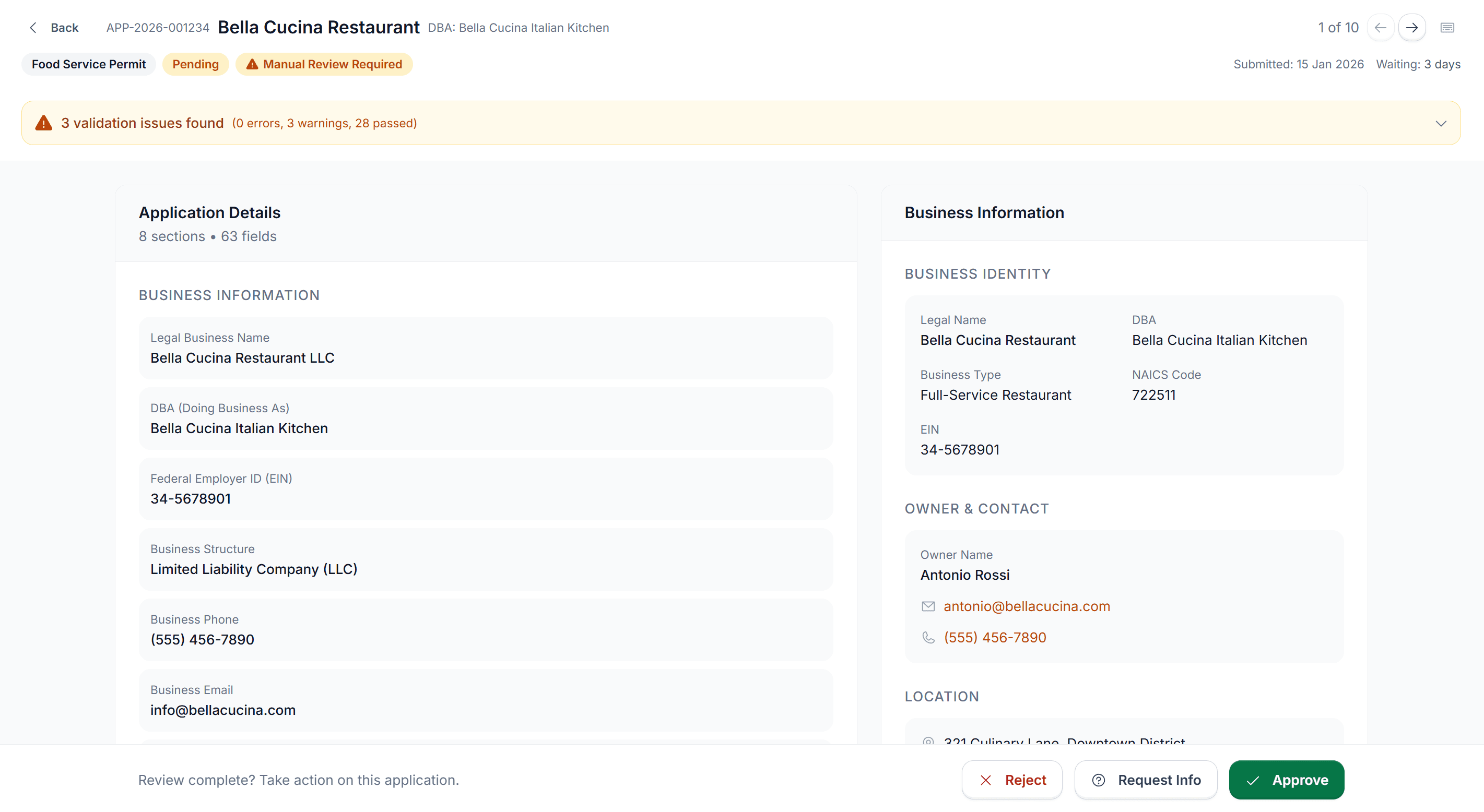
Click any application to open a detailed review panel without leaving the page. The slide-out shows the full application with submitted fields, business info, owner and contact details, location, and payment status. Validation issues are expanded at the top so you see exactly what needs attention. No PDFs to download. No separate systems to cross-reference.
- Tabs for Application, Business, Payment, and Notes
- Validation summary pinned to the top of every review
- Slide-out panel — never loses your place in the queue
Validation Issues
Issues surface before you start reviewing.
The auto-check system runs every application against your jurisdiction's requirements and flags what doesn't pass. Each issue is categorized and described in plain language. Issues are warnings, not blockers. Your team decides what to act on. Internal notes let reviewers document reasoning and recommendations — an audit trail that stays with the record.
- Plain-language descriptions for every flag
- Severity tags: warning, overdue, below threshold
- Reviewer notes pinned to the application record
Auto-Check · 3 issues
Ran 2 min ago
Health Certificate Expiry
Current certificate expires in 45 days. Renewal recommended before issuing license.
Liability Insurance Coverage
Coverage of $500,000 is below the $1,000,000 recommended for food service establishments.
Grease Trap Inspection
Last inspection 11 months ago. Monthly inspection cycle required by Chapter 30-8.
Maria Rodriguez
2h ago
Spoke with owner re: insurance. They're in the process of upgrading coverage. Recommend approving with a 60-day compliance window on the insurance threshold.
Request Additional Information
×How this works
The applicant gets an email with your message and deadline. If they don't respond in time, we'll notify you automatically.
Request Type
Message to Applicant
Response Deadline
Request Info · Take Action
Approve, reject, or follow up in seconds.
When an application needs more information, the Request Info flow sends a message directly to the applicant's email with a response deadline. Choose a request type, write a message, set a due date. If no response arrives by the deadline, you're notified automatically. For applications that are ready, approve or reject with a single click. Every action is logged, timestamped, and tied to the reviewer.
- Preset request types with custom message and deadline
- Automatic reminder if no response by due date
- Start Review mode — work the queue full-screen
By Role
Built for everyone an application touches.
Work through your queue faster.
Start Review mode opens applications full-screen so you can review, act, and move to the next without switching context.
See what's stuck and why.
Summary cards and wait-time tracking show which applications are overdue and which reviewers are assigned, so nothing falls through.
An audit trail for every decision.
Every approval, rejection, and info request is logged with the reviewer, timestamp, and notes. Ready for any audit or inquiry.
Know exactly what's needed.
Plain-language requirements, online filing from any device, and automatic status updates at every step. No phone tag, no guessing what's missing.
See it with your data
Stop chasing paper. Start reviewing.
We'll show you how Application Management works with your jurisdiction's license types and workflows.