
Platform / Campaigns
Design multi-stage outreach campaigns that escalate from friendly notice to formal enforcement. Track opens, clicks, and conversions in real time. Let the system do the follow-up.
Key Benefits
Enforcement that runs itself.
Staged outreach,
measured outcomes
Multi-stage escalation built in
Start with a friendly compliance notice. Escalate through attorney letters and enforcement warnings. Each stage sends automatically on schedule.
Target the right businesses
Filter recipients by license status, industry, compliance history, revenue, size, or years in business. Reach exactly who needs to hear from you.
Measure what's working
Track sent, opened, clicked, and converted for every campaign. Performance benchmarks show how your results compare to similar campaigns.
Campaign Dashboard
All your campaigns in one place.
The Campaigns page opens with four summary cards: how many campaigns are running, how many are scheduled this week, how many businesses you've reached this month, and your overall compliance conversion rate. Every campaign shows status, type, send date, recipient count, and real-time performance. Open any campaign to see detailed analytics, targeting, content, and the full recipient list.
- Four summary KPIs, counted in real time
- Open, click, and conversion on every row
- Filter: Active, Scheduled, Draft, Completed
Outreach funnel
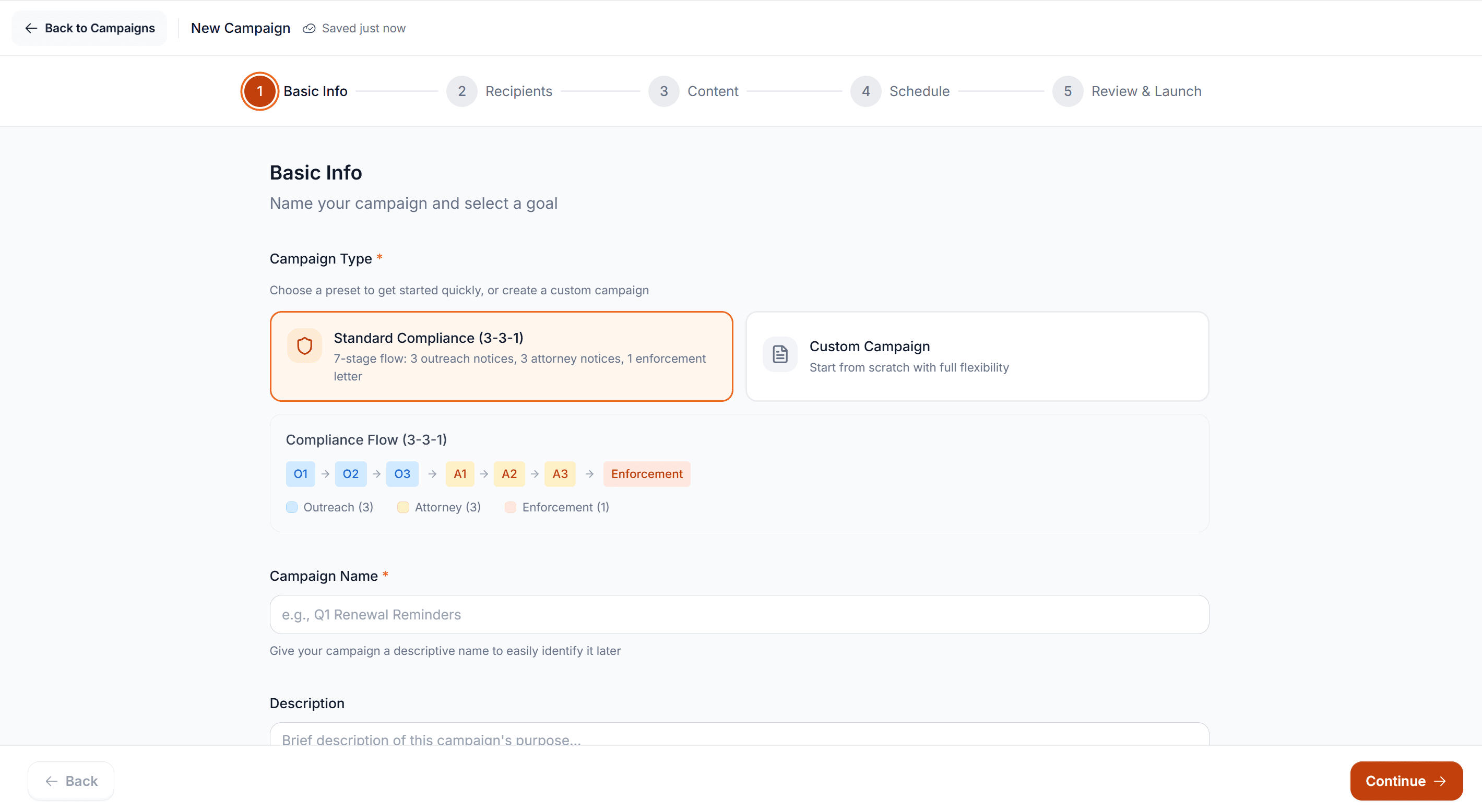
Basic Info
Name your campaign and select a goal
Standard Compliance (3-3-1)
7-stage flow: 3 outreach notices, 3 attorney notices, 1 enforcement letter
Custom Campaign
Start from scratch with full flexibility
Compliance Flow (3-3-1)
Campaign Name
Campaign Builder
Build a campaign in five steps.
The builder walks you through setup: name the campaign, pick a preset or build custom, define recipients, configure content and escalation, set the schedule, and review. The Standard Compliance preset uses a proven 3-3-1 flow: three outreach notices, three attorney notices, and one final enforcement letter — seven stages over 32 days. Or start from scratch with full control over timing, messaging, and escalation.
- Five-step wizard with stepper progress
- Standard 3-3-1 preset or fully custom flow
- Pre-assigned templates at every stage
Smart Targeting
Reach exactly who needs to hear from you.
Choose between filter-based selection and manual selection. Filter-based lets you build your recipient list using criteria that matter: license status, outreach status, NAICS code, compliance history, business size, revenue, and years in business. The estimated recipient count updates live as you adjust filters — so you know the scope before you send.
- Seven composable filter dimensions
- Live estimated recipient count
- Manual mode for precise, named targeting
Recipients
Choose who receives this campaign
Filter-based
Select recipients based on criteria
Manual Selection
Choose specific businesses
License Status
1NAICS Code
Filter by industry classificationArea
Incorporated · UnincorporatedCompliance History
Target by past recordCompliance Flow (3-3-1)
7 stages with pre-assigned templates
Per-business cycle: 32 days
Time for one business to go from first contact to final stage. The campaign runs continuously as new businesses enter.
Exit Criteria
A business exits when any condition is met
Business becomes compliant
Exit when business obtains required license or becomes compliant.
Contestation granted or company dissolution
Exit when contestation is granted or the company is dissolved.
Outreach Phase
Non-Compliance Notice — Initial
Non-Compliance Notice — Follow-up
Non-Compliance Notice — Final Warning
Escalation Flow · Content
Staged escalation with automatic follow-up.
The Content step shows your full escalation flow with every stage laid out in sequence. Each stage has a template, a channel (email, SMS, or both), and a configurable delay from the previous stage. Businesses that become compliant or receive a granted contestation exit the campaign automatically. Preview any stage, swap templates, or adjust timing without rebuilding the campaign.
- Per-business cycle of 32 days, editable
- Exit criteria: compliance, contestation, or dissolution
- Preview or swap any template in place
Analytics & Recipients
Know who opened, clicked, and converted.
Every campaign has a detailed analytics view showing sent, delivered, opened, clicked, and converted counts with percentage breakdowns. Performance benchmarks for your campaign type show how your results compare so you can tell whether a 26.7% conversion rate is strong. The Recipients tab lists every business with delivery status, opens, clicks, and bounces — exportable as CSV for reporting or follow-up.
- Sent, opened, clicked, converted with deltas
- Benchmarks by campaign type, side by side
- Bounced-email surfacing and CSV export
January 2026 Enforcement — Batch 1
47 recipients · Sent Jan 3, 2026
Sent
47
45 delivered · 95.7%
Opened
32
71.1%
Clicked
18
40.0%
Converted
12
26.7%
Performance Benchmarks (Non-Compliance)
Bounced emails
Terra Tacos
contact@terratacos.com
Mailbox not found
Campaigns / Email Templates
Email Templates
Manage reusable email templates for campaigns
Initial Compliance Notice (1/3)
First notice to businesses operating without proper licensing
Second Compliance Notice (2/3)
Second notice for businesses that have not responded
Final Compliance Notice (3/3)
Final notice before enforcement action
Enforcement Notice (1/3)
First enforcement escalation after compliance notices failed
Enforcement Notice (2/3)
Second enforcement notice with citation warning
Email Templates
Ready-made templates you can customize.
License Regulator ships with system templates for every stage of the compliance flow: initial notices, follow-ups, attorney letters, and final enforcement warnings. Each template is pre-written and tested. Use them as-is, customize for your jurisdiction, or create your own from scratch. The library tracks which campaigns use each template, how often it's been sent, and when it was last updated.
- System library covering every stage
- Usage counts and last-updated visibility
- Custom templates live alongside system ones
By Role
Built for the team that drives compliance.
Automated follow-up that doesn't slip.
Set up your campaign once and the system handles every stage. Businesses that comply exit automatically. No manual tracking.
Escalation with a clear paper trail.
Every notice, follow-up, and enforcement letter is logged with delivery status and timestamps. Defensible records at every stage.
Tie enforcement to revenue outcomes.
The compliance conversion rate shows exactly how many businesses came into compliance through your campaigns this month.
See it with your data
See how automated enforcement works.
We'll walk you through the campaign builder and show you how jurisdictions are converting noncompliant businesses at scale.